ConDoc Knowledge Base
  • Contact Support
  • Home
  1. Home
  2. How to Delete a Plan
Searching...

How to Delete a Plan

Steps

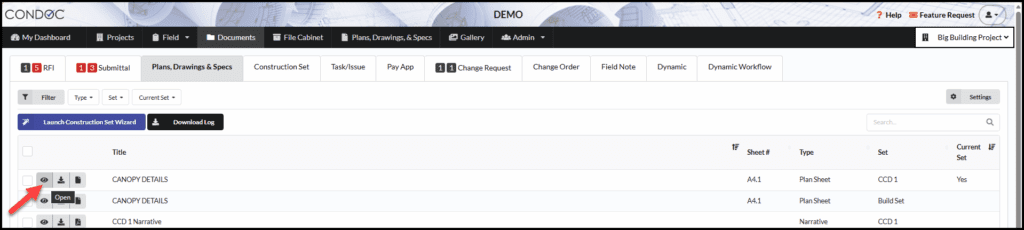
1. Navigate to Documents > Plans, Drawings, and Specs

2. Find the plan you would like to delete, and click on the eye to open it
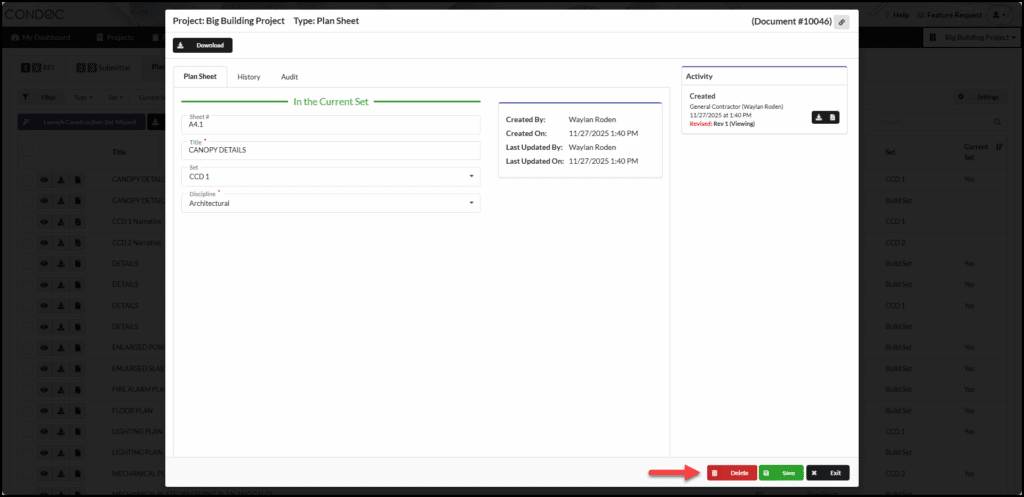
3. Click on Delete

See Also:

  • How to Delete a Plan Set
  • How To Edit/Add/Delete Your Plan Disciplines

Updated on December 2, 2025
Was this article helpful?
Yes No

Need help?
Call or email us:
1-800-715-1809
support@condoc.com

Related Articles

Popular Articles

  • RFI – An Overview
  • My Account Settings
  • Submittal – An Overview
  • RFI Visibility Settings
  • Plans, Drawings, & Specs
© Copyright ConDoc